Event 7704 DC Disconnection Point with Sunny Central Inverter | Knowledge | Salesforce
KnowledgeEvent 7704 DC Disconnection Point with Sunny Central Inverter
Solar Power Professional
Description
Event number 7704 on a Sunny Central inverter can occur shortly after a grid failure or early in the morning when the inverter is started.
Another symptom is that the DC switch is not working.
There are various reasons for event 7704 and all the possible measures must be checked for troubleshooting.
Relevant Devices
Sunny Central
- SC-xxxCP-10
- SC-xxxCP-JP
Corrective Measures
The following describes the four various reason with corrective measures/solutions:
- Are there any mechanical issues, abnormal noise, signs of burning or smoke?
- No - Proceed to step 2.
- Yes - Provide description and pictures to local SMA service partner or SMA service.
2. Check Spring Charging Motor
- Is the spring charged?
- No - Charge spring manually. Proceed to the next step.
- Yes - The spring charging motor is ok. Proceed to the next Troubleshooting option.
- If the spring can be charge manually and this resolves the error (double-check) the motor is faulty and needs to be exchanged.
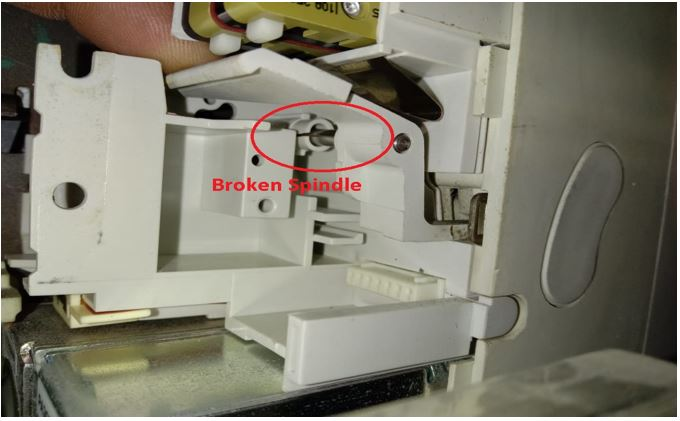
3. Check the DC switch spindle.
Check the DC switch spindle if it is broken or there is any other minor damage as shown in the figure below.
The damaged spindle or DC switch must be replaced.
4. Check the connectors at terminal no's: X755, X756 & X757.
The connectors are present inside the cable duct, usually near the DC switch.
Check the tightness of the cables and connectors, Also inspect the cable connections.
![[Event 7704 DC Disconnection Point with Sunny Central Inverter Knowledge Salesforce-1.png]]
**Note: The connectors are available in fabrication version: E4 & E7.
5.** If the error persists, contact your local SMA service partner or SMA service.